
One of the easiest space to de-clutter is your desktop PC. There are a few awesome organising widgets that you can use to organise your stuff. No longer you need to rummage through your directory to find those missing files and to keep on rearrange your icons all the time.
Here are some of the links of the widgets that I have been using to organise my own desktop.
 I like my desktop to be as clean and simple as possible.
Well, everyone knows that I'm still using XP. It is the most stable OS that Microsoft has churned out and most of the applications am running, currently have no fix and doesn't support the usage of Windows 7. An old hag, but still very much reliable.
OK. Let us begin.
1. Organise your icons.
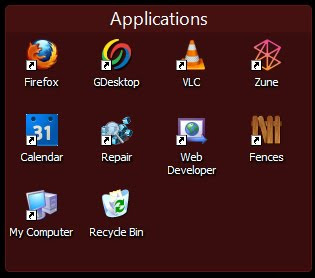
The one that am using above is called Fences. If what you need is to organise your icons accordingly, you can download the free version. It gives the illusion of fencing and segregating your icons according to how you want to organise it.
All you have to to is, once you have installed the app, launch it and drag your icons to it. Simple as 1-2-3.
2. To-do list.
Oh come on, you know you spend more time staring at your computer than going out socialising. LOL. What better way to remind yourself of those errands and chores that are just waiting to be done? Sticky notes on the fridge is way outdated. What we need is a virtual stick-on-note.
There a couple of options out there. If you are using Yahoo! Widget, then you can download the widget.
But what am about to recommend is something a bit more awesome than that typical sticky notes that are abundant out there. I use HottNotes.
Why? Because you can scribble on it, create a check-list and if you still prefer the old sticky plain note, they have that too. Most importantly it is created by Joel Riley, a student at Virginia Tech because he needed to list out things and I just love the fact that he shared this with the world.
 My very own hottnotes!
(As you can see, my niece is quite demanding, and annoying too)
3. Yahoo! Widgets or Google Desktop.
What differentiate the two? Well for me Yahoo! Widget is more cool and fun. It is so fun, sometimes the widgets don't really serve any purpose and being fun with a large consumption of RAM is just a big NO for me. I chose Google Desktop because I depend on them like an addict depends on crack. LOL.
Since am using the grand daddy of Android Phone (T-Mobile G1), I occasionally sync my calendar, email and my contacts to Google cloud. So it is just practical for me to use Google Desktop anyways. I got my RSS feed, bookmarks, Google reader all from there. So it's cool but most importantly, it serves me perfectly. So choose wisely on what you want to use.
psstt! I've managed to root my G1 and had updated it with Froyo 2.2. But that's another story for another day. :)
4. Zune.
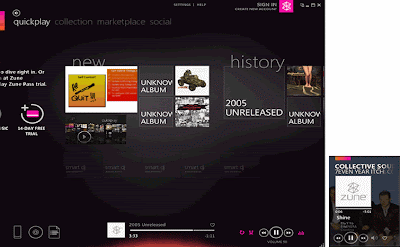
I've been using Zune for PC since the first day they published it. I kinda have a love-hate relationship with it. I hate their full version. It is just way to crowded for me. I like the fact that we get some sort of history about the artist, their music and everything but I usually need my music to be a background noise when am doing work. I don't really read those historical information and whatnot. The simple minimised version is totally for me; it doesn't really take up so much of space because my screen is not that big.
What? Winamp? Itunes? Oh come on, who uses that anymore? LOL.
P/S: If I download anything for free and if I like their application, especially programmer like Mr. Joel Riley, I usually paypal-ed them some money to show my gratitude and appreciation. We should always do that. As a developer myself, giving out or sharing free stuff is one thing, but to be able to know that someone appreciate what you have invented, the feeling is just too awesome, we might want to do more great stuff for you.
So be kind, donate some. :)
OK. Let us begin.
1. Organise your icons.

The one that am using above is called Fences. If what you need is to organise your icons accordingly, you can download the free version. It gives the illusion of fencing and segregating your icons according to how you want to organise it.
All you have to to is, once you have installed the app, launch it and drag your icons to it. Simple as 1-2-3.
2. To-do list.
Oh come on, you know you spend more time staring at your computer than going out socialising. LOL. What better way to remind yourself of those errands and chores that are just waiting to be done? Sticky notes on the fridge is way outdated. What we need is a virtual stick-on-note.
There a couple of options out there. If you are using Yahoo! Widget, then you can download the widget.
But what am about to recommend is something a bit more awesome than that typical sticky notes that are abundant out there. I use HottNotes.
Why? Because you can scribble on it, create a check-list and if you still prefer the old sticky plain note, they have that too. Most importantly it is created by Joel Riley, a student at Virginia Tech because he needed to list out things and I just love the fact that he shared this with the world.
 My very own hottnotes!
(As you can see, my niece is quite demanding, and annoying too)
3. Yahoo! Widgets or Google Desktop.
What differentiate the two? Well for me Yahoo! Widget is more cool and fun. It is so fun, sometimes the widgets don't really serve any purpose and being fun with a large consumption of RAM is just a big NO for me. I chose Google Desktop because I depend on them like an addict depends on crack. LOL.
Since am using the grand daddy of Android Phone (T-Mobile G1), I occasionally sync my calendar, email and my contacts to Google cloud. So it is just practical for me to use Google Desktop anyways. I got my RSS feed, bookmarks, Google reader all from there. So it's cool but most importantly, it serves me perfectly. So choose wisely on what you want to use.
psstt! I've managed to root my G1 and had updated it with Froyo 2.2. But that's another story for another day. :)
4. Zune.

I've been using Zune for PC since the first day they published it. I kinda have a love-hate relationship with it. I hate their full version. It is just way to crowded for me. I like the fact that we get some sort of history about the artist, their music and everything but I usually need my music to be a background noise when am doing work. I don't really read those historical information and whatnot. The simple minimised version is totally for me; it doesn't really take up so much of space because my screen is not that big.
What? Winamp? Itunes? Oh come on, who uses that anymore? LOL.
P/S: If I download anything for free and if I like their application, especially programmer like Mr. Joel Riley, I usually paypal-ed them some money to show my gratitude and appreciation. We should always do that. As a developer myself, giving out or sharing free stuff is one thing, but to be able to know that someone appreciate what you have invented, the feeling is just too awesome, we might want to do more great stuff for you.
So be kind, donate some. :)


